Contents · 30
- What technical SEO is and why it is the foundation
- Core Web Vitals 2026 - LCP, INP, CLS
- LCP (Largest Contentful Paint) - target <2.5s
- INP (Interaction to Next Paint) - target <200ms
- CLS (Cumulative Layout Shift) - target <0.1
- Benchmark table by industry
- Crawlability and indexability
- robots.txt - what to block and what not
- sitemap.xml - dynamic vs static, pinging
- Status codes - 200, 301, 302, 404, 410, 5xx
- Crawl budget - how to optimise for large sites
- Schema markup - 2026 update
- Article, Product, LocalBusiness, FAQPage
- Validation tools - Schema.org validator, Rich Results Test
- Nested schemas and their impact on SERP features
- Mobile-first indexing - a full audit
- Responsive vs a separate mobile site
- Viewport, tap targets, font sizes
- Site speed - 12 fixes that give the biggest gain
- HTTPS and security - a ranking signal
- HSTS, security headers
- Mixed content issues
- International SEO - hreflang
- hreflang attributes
- Geo-targeting in GSC
- JavaScript SEO - rendering issues
- SSR vs SSG vs CSR
- Dynamic rendering (deprecated)
- The most common technical SEO mistakes
- Summary
In the world of SEO, 60% of all ranking problems have a technical cause - slow loading, crawler blocks, missing schema markup, indexing errors, JavaScript rendering problems. And only 30% of Polish companies regularly run a technical SEO audit.
The rest invest in content and link building on a foundation whose architecture is fundamentally leaky - it is like building a skyscraper on sand. The best content will not help if Googlebot cannot index it efficiently.
In 2026 Google uses over 200 ranking signals - from obvious ones like quality content and backlinks, through Core Web Vitals (LCP, INP, CLS), to subtleties like HTTP/3 support, edge caching latency or schema markup nesting.
Algorithms learning from millions of user interactions understand when a site genuinely helps the user and when it only pretends to. 53% of mobile users leave sites that take longer than 3 seconds to load - and Google measures that.
This guide is a complete technical SEO toolkit for 2026: Core Web Vitals with concrete targets and fixes, schema markup with the latest extensions, crawlability/indexability optimisation, a mobile-first audit, site speed (the 12 fixes with the biggest impact), HTTPS/security headers, hreflang for international projects, and JavaScript SEO and rendering. With concrete tools, code snippets and benchmarks.
60%
53%
200+
What technical SEO is and why it is the foundation
Technical SEO is everything that happens under the hood of a site - the code, the infrastructure, the way it is rendered, the way it communicates with Googlebot. It is not content, not titles, not meta descriptions - it is the architecture that allows (or does not allow) Google to understand and index your site.
The SEO hierarchy looks like this: at the very bottom is technical SEO (the foundation), above it on-page SEO (content structure), above that content quality, and at the very top authority (link building, brand). Each level builds on the previous one. Without a technical foundation, on-page will not work. Without on-page, the best content will not be understood. Without quality content, link building achieves nothing.
The most common technical problems in Polish companies in 2026: (1) slow loading - LCP > 4 seconds on mobile, (2) missing schema markup or incorrect schema, (3) errors in robots.txt blocking important pages, (4) duplicate content through URL parameters, (5) incorrect canonical tags, (6) JavaScript rendering issues in SPAs, (7) missing hreflang on multilingual sites. A technical SEO audit reveals these problems systematically.
The value of technical SEO: one well-done audit + implementation can increase organic traffic by 30-200%. For example, for medium e-commerce stores that had an LCP of 5.2s and improved it to 2.1s, the average rise in conversion was 18% and in organic traffic 47% within 3 months of implementation.
Core Web Vitals 2026 - LCP, INP, CLS
Core Web Vitals are three key metrics Google uses to measure real user experience. In 2026 INP replaced FID as the official metric.
For your site to have a good CWV signal, all three must be in the Good range on 75% of all page views in a 28-day window.
LCP (Largest Contentful Paint) - target <2.5s
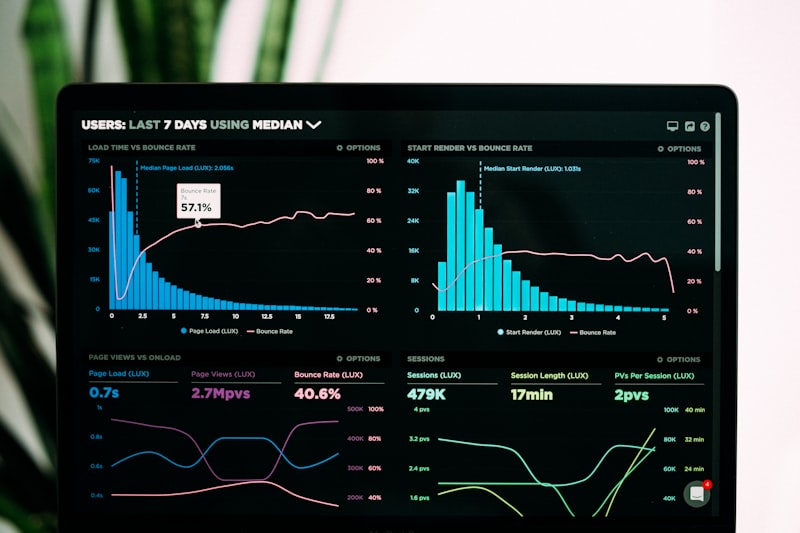
LCP measures how long it takes to load the largest visible element (usually the hero image or the main H1 text). The target: <2.5s = Good, 2.5-4.0s = Needs Improvement, >4.0s = Poor. In 2026 most sites achieve an LCP of 3-5s on mobile - that is too slow.
How to measure: PageSpeed Insights, Lighthouse, the Chrome DevTools Performance tab, the web-vitals.js library. Most important: real user data from the Chrome User Experience Report (CrUX), not only lab data.
The most common causes of a slow LCP: (1) slow TTFB (Time To First Byte) from the server - the fix: better hosting, CDN, edge caching, (2) JavaScript blocking before rendering - the fix: defer/async scripts, code splitting, (3) unoptimised images - the fix: WebP/AVIF format, responsive images, lazy loading, (4) slow fonts - the fix: font preload, font-display: swap, (5) no preconnect to the CDN/API.
Concrete implementations with the biggest impact: adding <link rel="preload" href="hero.webp" as="image"> for the hero image can improve LCP by 300-800ms. Moving from PNG to WebP/AVIF for the hero - 200-500ms. Premium hosting + CDN - a 200-700ms TTFB improvement.
INP (Interaction to Next Paint) - target <200ms
INP replaced FID (First Input Delay) in March 2024 as the official Core Web Vitals metric. INP measures not only the first click but all user interactions and their response time. The target: <200ms = Good, 200-500ms = Needs Improvement, >500ms = Poor.
INP is often the biggest problem in 2026 - because many sites have not been re-optimised since the change from FID. INP measures heavyweight interactions such as clicking a menu, sorting a product list, adding to a basket. JavaScript blocking the main thread causes a slow INP.
How to fix INP: (1) Minimise long tasks (>50ms) - split code into smaller chunks, use setTimeout or requestIdleCallback for non-critical operations, (2) Remove unnecessary JavaScript - tree shaking, code splitting per route, (3) Optimise third-party scripts - defer Google Analytics, Hotjar and customer service chatbots, (4) Use Web Workers for heavyweight calculations, (5) Optimise React rendering - useMemo, useCallback, React.memo for expensive components.
A practical tip: in fact most INP problems come from third-party scripts. Audit all external scripts (analytics, ads, chat widgets), optimise their load timing (defer, async, lazy load on interaction) and in extreme cases remove the ones with the biggest performance cost.
CLS (Cumulative Layout Shift) - target <0.1
CLS measures how much page elements "jump" during loading. The target: <0.1 = Good, 0.1-0.25 = Needs Improvement, >0.25 = Poor.
The most common causes of CLS: (1) no width and height on images -> text jumps when the image loads, (2) ad slots without reserved space -> ads "fall" into the content, (3) embedded iframes (YouTube, map) without dimensions, (4) FOUT/FOIT (Flash of Unstyled/Invisible Text) with custom fonts, (5) dynamically inserted content (cookie banners, popups).
Fixes: (1) always add width and height to <img> (or aspect-ratio CSS), (2) for ads/embeds reserve space via min-height or aspect-ratio, (3) font-display: swap + preload of key fonts, (4) cookie banners should not push content - they should overlay it.
CLS is the easiest of the three CWVs to fix, but it is often overlooked. A trap: some CLS shifts occur after the first few seconds (e.g. naked lazy-loaded ads) - you have to measure the full page lifecycle, not just the initial load.
Benchmark table by industry
| Industry | LCP target | INP target | CLS target | 2026 average |
|---|---|---|---|---|
| E-commerce | <2.0s | <150ms | <0.1 | LCP 3.4s, INP 280ms, CLS 0.18 |
| News/Media | <2.5s | <200ms | <0.1 | LCP 3.8s, INP 320ms, CLS 0.22 |
| B2B SaaS | <2.5s | <200ms | <0.1 | LCP 2.9s, INP 240ms, CLS 0.12 |
| Local businesses | <2.5s | <200ms | <0.1 | LCP 3.1s, INP 220ms, CLS 0.15 |
| Blog/Content | <2.0s | <150ms | <0.1 | LCP 2.6s, INP 180ms, CLS 0.13 |
E-commerce has the hardest targets because it needs the best conversions - on slow sites baskets are abandoned 4x more often. B2B SaaS has looser targets because users are more tolerant of work tools. News has to be fast because the reader has a meagre attention span.
Crawlability and indexability
Crawlability (can Googlebot visit the page) and indexability (can Googlebot index the page) are two different things. Crawl + index = potential for ranking. Without those two, content has no chance of appearing in search results.
robots.txt - what to block and what not
robots.txt is a file in the root directory of the domain (e.g. dekada72h.com/robots.txt) that tells crawlers what they can and cannot visit. It is the first thing Googlebot checks on entering a domain.
What to block in robots.txt: (1) admin panels (/wp-admin/, /admin/), (2) duplicate pages (e.g. /search?q=, /print-version), (3) the staging environment, (4) URLs with sorting parameters without a canonical (e.g. ?sort=price-asc), (5) webhook feeds, API endpoints.
What to NEVER block: CSS, JavaScript, image folders. Google needs these resources to render the page properly - without them Googlebot sees unstyled HTML and does not understand the structure. A common mistake: blocking /wp-content/ in WordPress -> Google does not load the styles -> a mobile-first ranking penalty.
A standard robots.txt in 2026:
User-agent: *
Allow: /
Disallow: /admin/
Disallow: /wp-admin/
Disallow: /search?
Disallow: /*?sort=
Disallow: /*?filter=

Sitemap: https://example.com/sitemap.xml
sitemap.xml - dynamic vs static, pinging
sitemap.xml is a list of all the URLs Google should visit. An ideal sitemap contains: every unique page URL, a lastmod date (when it was last changed), priority (0.0-1.0), changefreq (always/hourly/daily/weekly/monthly).
For small sites (up to 1,000 URLs) - a static sitemap.xml generated once, updated manually on changes. For medium (1,000-50,000 URLs) - dynamic generation from the framework (Next.js sitemap.xml.ts, generated at build), updated with every deploy. For large (50,000+ URLs) - a sitemap index with multiple sitemaps (each max 50,000 URLs, max 50MB), dynamic updating.
Pinging Google after a sitemap change used to be standard, but Google deprecated the ping endpoint in 2023. Today use Google Search Console -> Sitemaps -> Submit. Bing has its own IndexNow protocol (a POST request announcing new URLs) - for most sites a marginal difference, but for news/fast-changing sites it is worth it.
Status codes - 200, 301, 302, 404, 410, 5xx
Status codes are a signal to Googlebot on how to interpret a page. Misuse of status codes causes SEO problems.
- 200 OK - the page exists, indexable. The default for all content pages.
- 301 Moved Permanently - a permanent redirect. Use it for: a change of URL structure, domain migrations, www->non-www, http->https. Google passes full link equity (10 years ago it was 90%, today 100%).
- 302 Found / 307 Temporary Redirect - a temporary redirect. Use it for: A/B tests, geo-redirects, login flows. Do NOT use it for permanent changes - Google does not pass link equity.
- 404 Not Found - the page does not exist, never existed. OK for ordinary "page not found", but for old URLs (that were indexed) 410 is better.
- 410 Gone - the page existed but was permanently removed. More definitive than 404 - Google deindexes faster.
- 5xx Server Error - a server error. Repeated 5xx -> Googlebot reduces the crawl rate -> a drop in indexing. Monitor 5xx in GSC -> Crawl Stats.
The most common problem in 2026: 302 instead of 301 for permanent changes. A 302 does not pass link equity, so the target page does not get the benefits from the old one. Audit: Screaming Frog -> filter Status Code 302 -> check whether it is permanent or temporary.
Crawl budget - how to optimise for large sites
Crawl budget is the number of URLs Googlebot visits on a given domain in a given time. For small sites (up to 5,000 URLs) crawl budget is not a problem - Googlebot regularly crawls everything. For large sites (50,000+ URLs) - crawl budget can be a bottleneck.
Signals you have a crawl budget problem: (1) the GSC Coverage report shows "Crawled - currently not indexed" for many URLs, (2) recently modified pages are not updated in the SERP, (3) GSC Crawl Stats shows a slow crawl rate vs the number of URLs.
Crawl budget optimisation: (1) Block low-value URLs (filters, sorting, search results) in robots.txt, (2) Use the noindex meta tag for URLs that should not be in the index but can be crawled, (3) Optimise internal linking - key pages should be within 2-3 clicks of the homepage, (4) Remove duplicate content (canonical tags), (5) Improve site speed - faster loading = more crawling per unit of time.
Schema markup - 2026 update
Schema markup (structured data) is marking up key information in a way search engines understand. Schema.org defines 800+ types - from Article through LocalBusiness to Recipe, Event, Course. Well-implemented schema can double SERP CTR through rich results (stars, prices, reviews, FAQs).
Article, Product, LocalBusiness, FAQPage
Four schema types with the biggest impact on the SERP.
Article schema - for blogs, news, content sites. Requires: headline, datePublished, dateModified, author, publisher, mainEntityOfPage, image. Gives rich snippets with author and date, a "freshness" signal for Google. Implementation: JSON-LD in <head>, the easiest format.
Product schema - for e-commerce. Requires: name, image, description, sku, brand, offers (price, priceCurrency, availability), aggregateRating, review. Gives stars in the SERP, price, availability - all visible before the click. CTR boost: 30-100%.
LocalBusiness schema - for local businesses. Requires: name, address (PostalAddress), telephone, openingHours, geo, image, priceRange. Subcategories: Restaurant, Dentist, LawFirm, AutoRepair etc. Impact: ranking in the Local Pack (map + 3 listings), Knowledge Panel.
FAQPage schema - for pages with questions. Requires: a mainEntity array of Question (name) and acceptedAnswer (text). Gives an FAQ accordion directly in the SERP. CTR boost: 50-200% for long-tail queries. A quick win - easy implementation, big impact.
An example of FAQPage JSON-LD:
{
  "@context": "https://schema.org",
  "@type": "FAQPage",
  "mainEntity": [{
    "@type": "Question",
    "name": "What is technical SEO?",
    "acceptedAnswer": {
      "@type": "Answer",
      "text": "Technical SEO is the optimisation of..."
    }
  }]
}
Validation tools - Schema.org validator, Rich Results Test
After implementation ALWAYS validate the schema. Incorrect schema can harm SEO more than no schema (Google may impose penalties for misleading structured data).
Tools: (1) Google Rich Results Test (search.google.com/test/rich-results) - Google's official tester, shows whether the schema qualifies for rich results. (2) Schema.org Validator (validator.schema.org) - validates the syntax and structure of the schema. (3) GSC -> Enhancements - shows all the schema implementations on your site + errors.
The most common schema errors: (1) missing required fields (e.g. Article without datePublished), (2) wrong data types (string vs date), (3) duplicate schema (the same Article schema in 3 places on the page), (4) misleading schema (Product schema with fake ratings - a Google penalty).
Nested schemas and their impact on SERP features
An advanced technique: nested schemas - one schema inside another. For example: Article + Author + Organization + Publisher + Image + BreadcrumbList. The more nested schemas, the greater the chance of rich results.
A practical example - a blog article in 2026 ideally has:
- Article (with headline, dates, image)
- Person (Author, with an @id)
- Organization (Publisher, with a logo)
- BreadcrumbList (URL structure)
- WebPage (at the page wrapper level)
All connected through @id references, in one JSON-LD block. This helps Google understand the entity relationships on the page.
Mobile-first indexing - a full audit
Since 2021 Google has used the mobile version of a site as the primary index (mobile-first indexing). That means ranking is based on how the site looks and works on mobile, not on desktop. In 2026 more than 75% of searches come from mobile.
Responsive vs a separate mobile site
Three ways of mobile design:
- Responsive design (recommended for 2026) - one URL, one HTML, CSS adapts the layout to the device. Pros: one URL, one content, one SEO effort. Cons: requires skilled CSS.
- Dynamic serving - one URL, but the server delivers different HTML for mobile vs desktop. Pros: full control over the mobile experience. Cons: requires a
Vary: User-Agentheader, complicated caching. - A separate mobile site (m.example.com) - a separate URL for mobile. Pros: full separation. Cons: two versions to maintain, canonical/hreflang problems, a deprecated approach.
In 2026, 99% of new projects use responsive. Separate mobile sites are a legacy of the 2010s - if you have one, migrate to responsive.
Viewport, tap targets, font sizes
Mobile-friendly fundamentals:
- Viewport meta tag:
<meta name="viewport" content="width=device-width, initial-scale=1">- without it mobile browsers render the desktop layout zoomed out. Critical. - Tap targets: a minimum of 48x48 pixels, a minimum of 8px spacing between them. Small buttons are a mobile UX nightmare and a Google ranking penalty.
- Font sizes: a minimum of 16px for body text. Smaller fonts force zooming -> bad UX.
- Horizontal scrolling: NEVER. The page must fit in the viewport without horizontal scroll.
- Touch-friendly interactions: hover effects do not work on mobile - you need alternative interactions.
Test: the Google Mobile-Friendly Test (search.google.com/test/mobile-friendly) - Google's official test with concrete recommendations.
Site speed - 12 fixes that give the biggest gain

Site speed is directly Core Web Vitals and indirectly conversion. An average site speed boost of 1 second -> a 7% rise in conversion, an 11% rise in view-to-click rate. The 12 fixes with the biggest ROI:
-
Image optimisation (WebP/AVIF, lazy loading, sizes) - images are most often 50-70% of a page's weight. WebP reduces size by 30-50% vs JPEG, AVIF by 50-70%. Lazy loading (
loading="lazy") delays loading images outside the viewport. Responsive images (srcset,sizes) serve the right size for the device. -
Code splitting and tree shaking - split the JavaScript bundle per route. The homepage does not need the admin panel's code. Tree shaking removes unused code from bundles. Tools: webpack, Vite, Rollup. Average boost: 200-800ms LCP.
-
HTTP/2 and HTTP/3 - HTTP/2 multiplexes connections (one connection for many resources), HTTP/3 is based on QUIC (UDP) - even faster. Requirement: HTTPS. Boost: 100-400ms TTFB.
-
Brotli compression - 15-25% better than gzip. All modern hosting/CDNs support it. Configuration: add brotli to the nginx/apache config. Boost: 50-200ms on transfer time.
-
Critical CSS inline - inline the key styles in
<head>, defer loading of the rest of the CSS. It lets you render above-the-fold content without waiting for the full CSS download. Tools: Critical, Penthouse. Boost: 200-500ms LCP. -
Deferred JavaScript -
deferorasyncattributes on non-critical scripts. Tags for analytics, ads, chat widgets - always defer. Boost: 100-400ms LCP, a significant INP improvement. -
CDN (Content Delivery Network) - serving static assets from geo-distributed edge servers. Cloudflare, Fastly, AWS CloudFront, BunnyCDN. For Poland: better performance from European edge nodes. Boost: 100-500ms TTFB for global traffic.
-
Edge caching - caching full HTML pages at the CDN level. For static content (blog posts, landing pages) a game-changer. Cloudflare, Vercel Edge, Netlify - all support it. Boost: 500ms-2s TTFB.
-
Font optimisation - preload critical fonts, font-display: swap, subset fonts (only the characters needed), self-host fonts (instead of the Google Fonts CDN).
-
Resource hints -
preconnect,dns-prefetch,preload,prefetch. They tell the browser that it will shortly need some resource. -
Database query optimisation - for dynamic sites, slow queries -> slow TTFB. Indexing, caching (Redis, Memcached), N+1 query problems.
-
Image dimensions in HTML - always
widthandheighton<img>. It helps the browser allocate space (CLS) and does not block rendering.
Implementing all 12: 2-6 weeks of work for medium sites, 2-6 months for large ones. ROI: a 30-60% improvement in Core Web Vitals, a 20-50% rise in organic traffic within 3-6 months.
HTTPS and security - a ranking signal
Since 2014 Google has treated HTTPS as a ranking signal. In 2026 an unsecured (HTTP) site is realistically unsustainable - browsers mark it "Not Secure", users bounce, Google lowers rankings.
HSTS, security headers
HTTPS is the baseline. Above it are security headers, which improve the security score (and indirectly SEO).
HSTS (HTTP Strict Transport Security) - the browser remembers that the domain must be HTTPS and blocks HTTP requests. Header: Strict-Transport-Security: max-age=31536000; includeSubDomains; preload. For maximum security: the HSTS preload list (hstspreload.org) - the browser has a built-in list.
Other security headers:
Content-Security-Policy(CSP) - blocks XSS attacksX-Frame-Options: DENY- blocks clickjackingX-Content-Type-Options: nosniff- blocks MIME sniffingReferrer-Policy: strict-origin-when-cross-origin- controls referrer infoPermissions-Policy(formerly Feature-Policy) - controls browser features
Test: securityheaders.com - a free tool showing all headers + an A-F score. The goal: at least an A.
Mixed content issues
Mixed content = an HTTPS page loading HTTP resources (image, script, iframe). The browser blocks active mixed content (script, iframe) and warns about passive (image, css). This hurts SEO and the security score.
Audit: GSC -> Security Issues, the Chrome DevTools Console (mixed content warnings), a Lighthouse audit. Fix: change all http:// links to https:// or use protocol-relative //example.com.
For old sites migrating from HTTP to HTTPS: Search & Replace the whole of the hardcoded URLs in content + reconfigure the CMS. It is one of the most common problems during migration.
International SEO - hreflang
Hreflang is the mechanism Google uses to understand which version of a page is for which language/region. Critical for multilingual sites - without hreflang Google may show Polish users the English version of a page and vice versa.
hreflang attributes
Implementing hreflang - three ways:
- HTML link tags in
<head>- the most common:
<link rel="alternate" hreflang="pl" href="https://example.com/pl/" />
<link rel="alternate" hreflang="en" href="https://example.com/en/" />
<link rel="alternate" hreflang="x-default" href="https://example.com/" />
- HTTP headers - for non-HTML files (PDFs):
Link: <https://example.com/pl/>; rel="alternate"; hreflang="pl"
- Sitemap hreflang - for large sites:
<url>
  <loc>https://example.com/pl/</loc>
  <xhtml:link rel="alternate" hreflang="pl" href="https://example.com/pl/"/>
  <xhtml:link rel="alternate" hreflang="en" href="https://example.com/en/"/>
</url>
The key: hreflang must be bidirectional (each version references every other and itself). x-default is the fallback (when no language matches).
Geo-targeting in GSC
Google Search Console -> Settings -> International Targeting. You can set a country target for the whole domain or for subfolders. Example: example.com/pl/ -> target Poland.
Domain strategy options:
- ccTLD: example.pl, example.de - an automatic country signal, but brand fragmentation
- Subdomain: pl.example.com - a separate GSC property per subdomain
- Subfolder: example.com/pl/ - recommended for 2026, the easiest to maintain, one authoritative domain
JavaScript SEO - rendering issues
JavaScript-heavy sites (React, Vue, Angular SPAs) had a big SEO problem 5-7 years ago. Today the situation is better, but it requires rethinking the rendering strategy.
SSR vs SSG vs CSR
Client-Side Rendering (CSR) - the browser downloads empty HTML + a JS bundle and renders the JS in the browser. The problem: Googlebot gets empty HTML and has to wait for JS rendering (indexing delayed by 1-3 days). For content-heavy sites - the wrong choice.
Server-Side Rendering (SSR) - the server renders full HTML and sends it to the browser. Googlebot gets the full content straight away. Frameworks: Next.js, Nuxt, SvelteKit, Remix. Best for dynamic content with frequent updates.
Static Site Generation (SSG) - HTML is pre-generated at build and served as static files. The fastest, the best SEO. Frameworks: Next.js, Gatsby, Astro, Hugo. Ideal for content sites (blogs, marketing pages).
In 2026 the recommendation: SSG for content sites (blogs, landing pages, HTML vs WordPress), SSR for dynamic apps (e-commerce, dashboards), CSR only for authenticated admin panels (where SEO does not matter).
Dynamic rendering (deprecated)
Dynamic rendering = the server recognises the user agent (Googlebot vs human) and serves different versions of the page - static HTML for the bot, the JS app for the human. Google recommended this in 2018-2022 as a workaround for SPA sites.
In March 2024 Google deprecated dynamic rendering as a recommendation. The reason: it does not fit the principles (cloaking issues), and modern SSR/SSG are a better solution. In 2026 - if you have dynamic rendering, plan a migration to SSR/SSG within the next 12-18 months.
The most common technical SEO mistakes
The 10 fixes with the biggest impact on rankings that we regularly see in Polish companies in 2026:
-
No SSL or mixed content - quite a lot of small companies are still on HTTP. Fix: a direct migration to HTTPS with 301 redirects.
-
Slow LCP on mobile - a default WordPress install with an unoptimised hero image. Fix: WebP/AVIF + preload + image dimensions.
-
No schema markup - many sites lack basic schema (Organization, BreadcrumbList). Fix: 2-3 hours of JSON-LD implementation.
-
An incorrect canonical - duplicate content through URL parameters without a canonical. Fix:
<link rel="canonical" href="..." />on every page. -
No hreflang on multilingual sites - Google chooses the wrong version for users. Fix: implement hreflang.
-
Duplicate H1 or multiple H1s on a page. Fix: one H1 per page, an H2/H3/H4 hierarchy.
-
No meta descriptions or generic descriptions. Fix: a unique meta description per page, 150-160 characters.
-
An incorrect robots.txt blocking CSS/JS. Fix:
Allow: *.css,Allow: *.js. -
404 for important URLs after migration. Fix: 301 redirects from the old URLs.
-
No XML sitemap or an outdated sitemap. Fix: dynamic sitemap generation, submit to GSC.
Summary
Technical SEO is the foundation on which the rest of the SEO strategy is built. Without a technical foundation, even the best content and link building will not give their full effect. The biggest ROI in 2026 comes from: Core Web Vitals optimisation (LCP, INP, CLS), implementing comprehensive schema markup, a mobile-first audit and fixes, site speed optimisation (the 12 fixes from the article), HTTPS + security headers, and correct crawlability and indexability.
An average technical SEO audit + implementation of the fixes is 2-4 months of work, but the effects - a 30-200% rise in organic traffic - last for years. It is an investment that pays back many times over. Especially for company websites and e-commerce competing in saturated industries.
The strategic order: (1) a technical audit + quick wins (CWV, schema, mobile) - month 1, (2) deeper fixes (rendering, indexability, internal linking) - months 2-3, (3) monitoring and iteration - continuous. Without monitoring even the best fixes degrade over time - every new deploy can introduce a regression.
If you run a business and your site is not bringing the expected traffic from Google - start with a technical SEO audit. Very often it turns out that the problem is not content or link building but technical issues that block the effectiveness of the whole strategy. At Dekada72H we carry out comprehensive technical SEO audits + implement fixes with measurable effects. Get in touch.